> ## Documentation Index
> Fetch the complete documentation index at: https://staff.ermbot.xyz/llms.txt
> Use this file to discover all available pages before exploring further.
# Actions
> Here you will find out to setup custom actions to utilize the PRC API.
These steps will only work if the PRC API pack has been purchased for the server. If it has not, it needs to be purchased before they continue with the steps.
1. Run the command `/actions manage`
2. Create the action, and configure what you want the action to do.
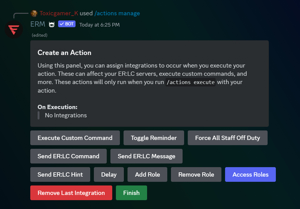 * Actions can do many things! However, we will mainly be focusing on the API features.
* With actions, you're able to execute multiple ER:LC in-game commands with one Discord command. This is useful for server shutdowns, STS/rule briefings, etc.
**Send ER:LC Command:** This allows you to send any ER:LC command in-game.
* Actions can do many things! However, we will mainly be focusing on the API features.
* With actions, you're able to execute multiple ER:LC in-game commands with one Discord command. This is useful for server shutdowns, STS/rule briefings, etc.
**Send ER:LC Command:** This allows you to send any ER:LC command in-game.
 **Send ER:LC Message:** This allows you to send an :m announcement in-game.
 **Send ER:LC Hint:** This allows you to send ER:LC hint messages.