> ## Documentation Index
> Fetch the complete documentation index at: https://staff.ermbot.xyz/llms.txt
> Use this file to discover all available pages before exploring further.
# Theme Market Policies
The guidelines provided below are an example of what enforcement should be expected. It is at the discretion of the staff for experiences not displayed below that provide a negative experience.
## Publisher's Policy
* Abusive or Destructive Behaviour
> Abusive and/or Destructive themes are outlined by the following;
>
> 1. Themes purposely imposing a risk to users visually, physically or mentally. I.E; epilepsy or other visual impairment.
> 2. Providing a negative experience towards the service. I.E; Harming the users experience and accessibility.
> 3. Purposely ensuring all colours of theme remain the same or extremely simular.
> 4. With malicious intent, attempt to and/or successfully bypassing site security measures.
* No tolerance of spamming.
> While publishing themes to the service, you must respect the rate limits enforced provided to your user. Under no circumstances should a user attempt to bypass these published rate limits.
* Equality when handling reviews.
> Under no circumstances, should your coordinate or participate in the coordination of "raiding" or mass reviews of themes to negatively impact the score of the theme.\`
ERM Staff, at any may request the removal, or forcefully removal of themes at its discretion.
## Removing Themes
Should a theme not follow the guidelines provided above, the following actions will be taken;
* You are to provide the user with a warning, and a reason as to why the theme is being removed.
* This to ensure the user is aware of the reason and can take the necessary steps to correct the issue.
* You are to issue this to the user's direct messages.
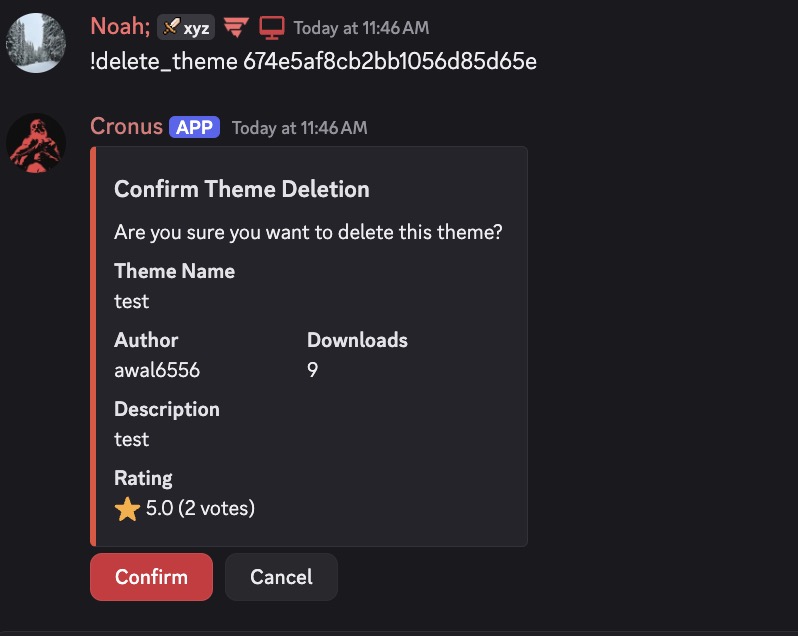
> Command usage would be as follows;
>
> * !delete\_theme [Theme\_ID](#finding-a-theme-id)
 ### Example messages
Minor Case;
* `Hey @(user), your theme (Theme Name) has been removed for (List Reason/s). Please review the the reasons provided and re-upload your theme after you have corrected it.`
Extreme Case;
* `Hey @(user), your theme (Theme Name) has been removed from the marketplace. The severity of the case has resulted in a ban from publishing to the marketplace. If you believe this is in mistake, please contact support in our [community server](https://discord.gg/ermbot).`
### Finding a Theme ID
To find a theme ID, you are to follow the steps below;
1. Navigate to the theme you wish to remove.
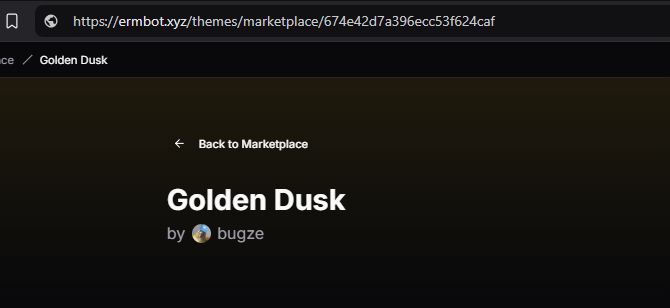
2. Locate the URL of the theme.
3. The theme ID is the last part of the URL. I.E; `https://ermbot.xyz/themes/marketplace/123456789`
### Example messages
Minor Case;
* `Hey @(user), your theme (Theme Name) has been removed for (List Reason/s). Please review the the reasons provided and re-upload your theme after you have corrected it.`
Extreme Case;
* `Hey @(user), your theme (Theme Name) has been removed from the marketplace. The severity of the case has resulted in a ban from publishing to the marketplace. If you believe this is in mistake, please contact support in our [community server](https://discord.gg/ermbot).`
### Finding a Theme ID
To find a theme ID, you are to follow the steps below;
1. Navigate to the theme you wish to remove.
2. Locate the URL of the theme.
3. The theme ID is the last part of the URL. I.E; `https://ermbot.xyz/themes/marketplace/123456789`
 ### Extreme Cases
Should the user do any of the following, you are to ban them from creating themes;
* Attempt to bypass the rate limits.
* Attempt to bypass the security measures.
* Posting slurs or other inappropriate content within the theme.
* Posting offsite links to malicious or harmful content.
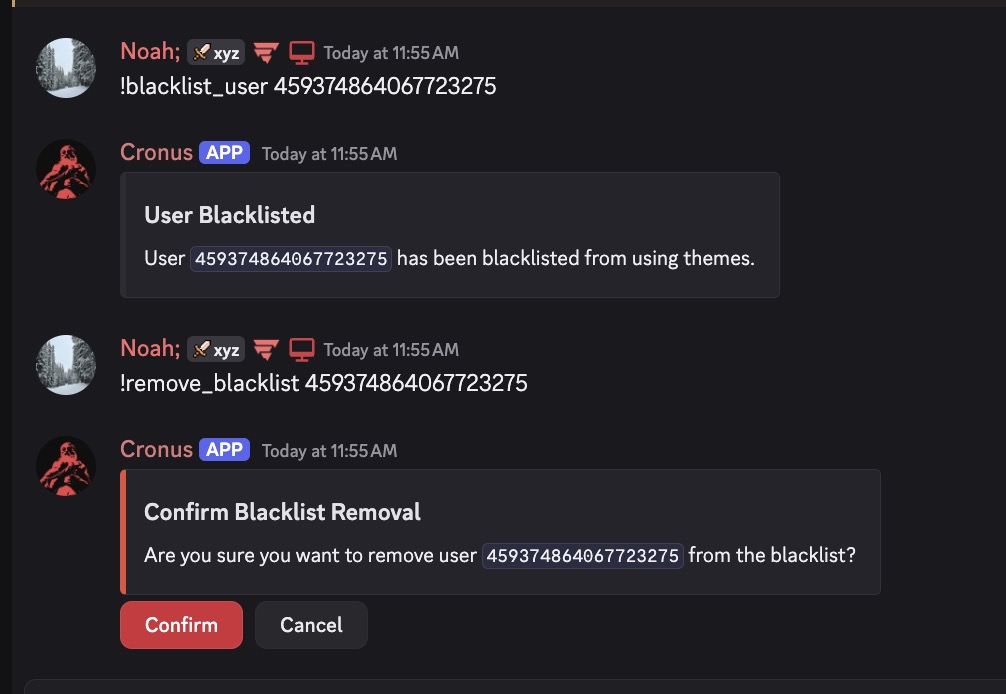
> Command usage would be as follows;
>
> * !blacklist\_user User\_ID
> * !remove\_blacklist User\_ID
### Extreme Cases
Should the user do any of the following, you are to ban them from creating themes;
* Attempt to bypass the rate limits.
* Attempt to bypass the security measures.
* Posting slurs or other inappropriate content within the theme.
* Posting offsite links to malicious or harmful content.
> Command usage would be as follows;
>
> * !blacklist\_user User\_ID
> * !remove\_blacklist User\_ID