1 | Join the ERLC Server
1 | Join the ERLC Server
- Join the ER:LC server and open the server settings. .2 Find the “ER:LC API” section, and click edit on the “Server key” tab.
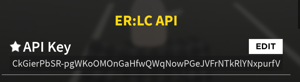
- Copy the API key, and then continue to step 2!
2 | Link the key with ERM
2 | Link the key with ERM
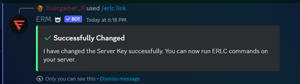
- Once you have the API key copied, you are going to go to the Discord server and run the command /erlc link
- input the key in the space provided within the link command, and send the command. As long as the API key is valid, you should see a message like this: